
Quick answer: A UK primary school can fill an open day with a few hundred pounds of spend on Facebook and Instagram advertising, targeted at parents within two to three miles. Two routes: the Boost button (five minutes, no ad account, fine for awareness) or Meta Ads Manager (proper objectives, a pixel, retargeting and real cost-per-booking tracking).
The critical 2026 change: your targeting choices are now suggestions Meta's AI can override, exclusions have gone from boosted posts, and dozens of interest categories were removed in January 2026 — so who you reach is less controllable than it was, which makes measuring bookings, not clicks, the only reliable feedback loop.
Most advice about Facebook ads for schools was written for a platform that no longer exists.
We looked at the pages currently ranking in Google search for this topic. One tells schools to click the blue Promote button and target a fourteen-mile radius — for a primary school whose catchment is about a mile. Another is about American universities. A third is a genuinely thorough guide to enrolment marketing in US school districts, priced in dollars, but it cites an article about television advertising from over a decade ago. Not exactly current…
None of them mentions what Meta changed in 2025 and 2026. None mentions the January application deadline. None mentions what to do about photographing children, which is the first question every headteacher actually asks.
So here is the version for a UK school, this year.
What changed on Meta, and why it matters to you
Three changes in the last eighteen months, all pointing in the same direction: less manual control, more automation.
Advantage+ audience is the default. When you set up most campaigns now, Meta's AI decides who sees your ad. Your age, gender and interest selections are treated as suggestions it can go beyond, not fences it must stay inside.
Detailed targeting exclusions were removed — from Ads Manager in March 2025, and from boosted posts in June 2025. You can no longer say "don't show this to X."
Dozens of detailed interest categories were removed in January 2026. The granular interest targeting people built strategies around is substantially gone.
What survives, and what your campaign should therefore rest on: location is still a hard control. So is minimum age. Parental status is still available under Demographics. That's the spine of a school campaign — a tight radius around the school, adults, parents — and it happens to be the targeting that matters most for admissions anyway.
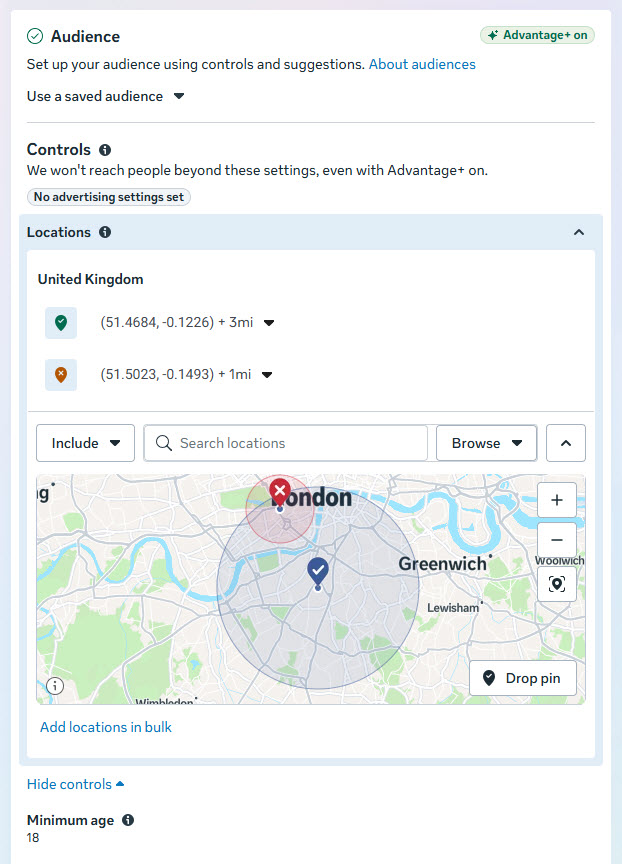
When you're using Meta Ads Manager you set the location and distance around your school at the Ad Set level and that looks like this. The red circle is a location exclusion (still available), applied here because we know most parents in London don't cross the Thames for school!
And this is what you're looking for as age and interest targeting. At the moment, you can still target parents with children between 3-5 years of age. We set the target audience age from 22 to reach young parents, but no lower. And we go up to 64 to catch grandparents or guardians. We could go a little lower or higher, but we think this is covering 99% of the possible target market.
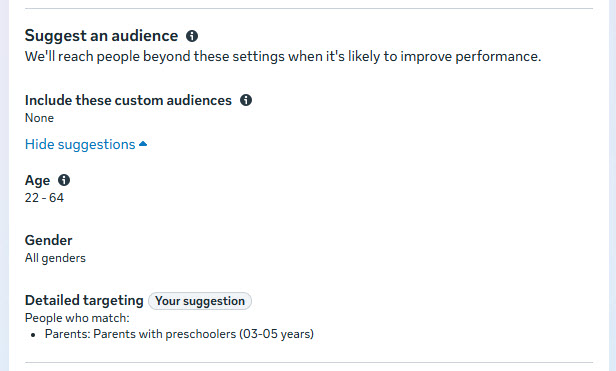
The practical consequence: you can't finely control who sees your ad any more than that, but this is close enough. Control the geography, make the creative do the qualifying (if you use a poster, an ad, or multiples thereof that say "Reception places, September 2027," they filter their own audience), and judge everything by bookings rather than reach.
If you use Boosted Posts outside a full Meta Ad account you will get essentially the same targeting options but with less refined control.
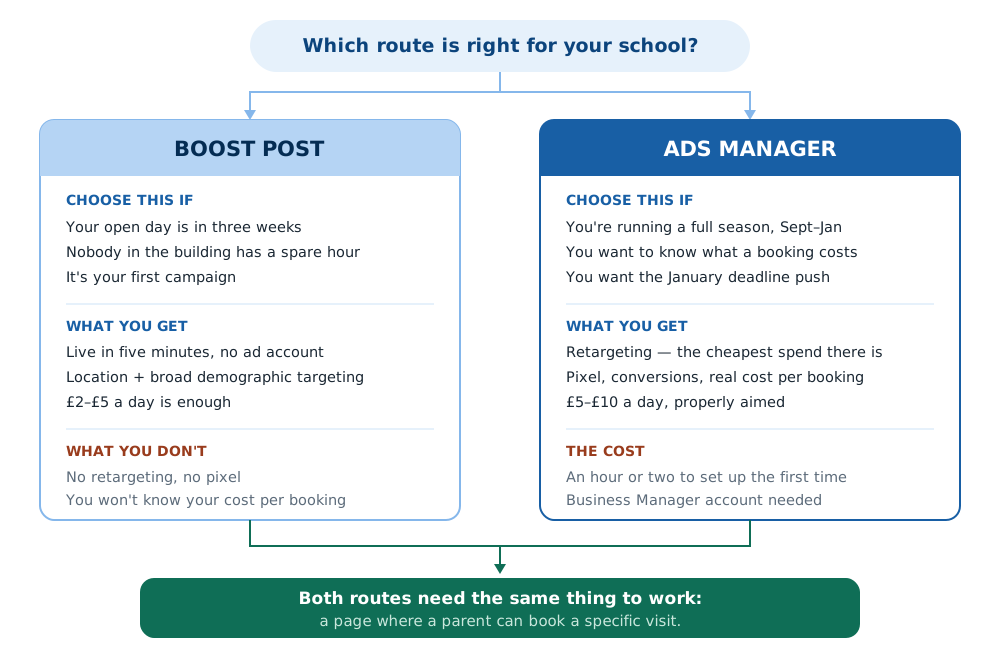
Boost button or Ads Manager? An honest comparison
Boost post | Ads Manager | |
|---|---|---|
Setup time | Five minutes, from your page | An hour or two the first time |
Ad account | None to set up — Meta creates one for you automatically | You create one deliberately, inside Business Manager |
Objectives | Three simple goals | Full range, including conversions |
Targeting control | Location, age, broad demographics | Same, plus custom and lookalike audiences |
Retargeting people who didn't book | No | Yes |
Pixel / conversion tracking | Not by default | Yes |
Knows your cost per booking | No | Yes |
Realistic budget | £10–£20/day | £5–£20/day (longer period) |
Best for | One open day, no time, no technical help | A full admissions season, September to January |
One thing to sort out before your first boost, even if you never intend to use Ads Manager
Boosting doesn't avoid having an ad account — it just creates one for you, in the background, and usually attaches it to the personal Facebook profile of whoever pressed the button. That means the school's advertising history, payment details and audience data end up belonging to a member of staff rather than to the school. When they move on, it goes with them, and nobody left in the building can see what was spent or what worked.
The fix is to set up Meta Business Suite for the school first, add the school's Facebook Page to it, and boost from there. Then the ad account belongs to the school, more than one person can get into it, and it can be handed over cleanly when someone leaves.
We won't pretend that's a quick job. Setting up Business Suite and Business Manager is a genuine pain — the interface is confusing, the permissions model is worse, and Meta's own help pages are written for people who already understand it. If you can find a governor or a parent with some experience of it who'll sit down and help, that will pay for itself. Once it's up and running it's relatively intuitive to use; it's the setting up that's miserable.
Use the boost button if this is your first campaign, the open day is in three weeks, and nobody in the building has an hour spare. It genuinely works for awareness, and a well-made post boosted to local parents will fill seats.
Move to Ads Manager when you want to know what a booking costs, when you want to bring back the parents who visited your website and didn't book, and when you want to run a proper deadline campaign in January. Retargeting is a real advantage — it's cheap and it converts well — though in a market this small it matters less than it would for a national advertiser, so don't move to Ads Manager for that reason alone. The stronger arguments are knowing your cost per booking and having the control to run January properly. That said, it does take another level of learning to be able to set it up and make it effective.
Before the ad: the thing that decides whether it works
An ad's job is to deliver a click. So first and foremost, it's to make sure parents of reception-age children in your area know about the school. Then it should make them sufficiently interested in the school — because it looks appealing and meets their needs — to get them to click to come and visit. It doesn't do the whole job of selling the school to them. That's what happens when they come on the visit. So what happens after they click on the ad decides whether you get a pupil.
Send that click to a page where a parent can book a specific visit — a date, a name, an email, a confirmation. Not your homepage. Not a PDF of the prospectus. Not "contact the office." It must be a way to either register for a one-on-one visit or for the open evening, and you must get contact details.
We long understood the role of the ad from our digital marketing business, but we proved it in our published case study: the school's tour booking page converted better than every other landing page we tested, and once we sent all the ad traffic there, applications went from 53 to 97 in a single admissions cycle on about £1,000 of advertising. The ads got the attention. The booking page turned it into a class.
If you take one thing from this article: build the booking page before you spend a penny on ads. How we build them
The creative that works for schools
One photograph of happy children, looking at the camera. That's it. Not the building, not the crest, not a collage.
Elsewhere on our site we talk about using posters to attract the attention of potential parents. A great place to start, particularly if you're using Boosted Posts, is simply to take that poster and use it as your ad on Facebook and Instagram.
But it depends on how busy that artwork is. What works as a poster on a library noticeboard can carry a little bit more text, but it might look too busy as an image in an Instagram feed, and that just means more people will scroll past without reading it.
If you've already made an open day poster, that artwork is your ad creative — resize it and you're done. Same asset, working on lamp posts, in feeds, and on screens.
But if there's a lot of text on it, take the main elements of that poster and one strong call to action ("Book Your Visit" or "Meet the Head", for example), but shift most of the rest of the copy off the poster image and into the description area of the ad. That will allow the image of the poster to stop people scrolling, then they'll read the headline in the image, then read the text that you add separately when creating the ad, which will sit underneath.
Everything else follows the poster rules: the school name, the date of the open day or tour, one line about what makes the school special, and an obvious way to book.
Copy that works, roughly in this order: the specific date · a named human ("come and meet Mrs Ahmed, our head") · one differentiator (forest school, the breakfast club, the fact that every child is known by name) · two ways to book · a warm all-welcome line. Short. Again, remember that parents are scrolling.
You should also seriously consider video. It often outperforms still images. We routinely run ads that are the official school promotional video, and they can do really well. But we often cut those into shorter clips that focus on one benefit of the school. And we also regularly use easy-to-make clips that look more native to Instagram: sixty seconds of your head talking to camera, shot on a phone, can be more persuasive than anything polished and generic. Try both! We’ve written lots more thoughts on school video here.
And if you have decent photography, this is where it earns its money — stock photos of children fool nobody, least of all parents. Our insight on school photography is set out here.
Safeguarding: the question every head asks first
No article ranking for this topic addresses it, which tells you how little they know about schools.
Photographs of pupils in paid advertising are a different consent question from photographs on your website. Your existing photo consent form almost certainly covers "school publicity" in general terms — but a parent who agreed to a newsletter photo may not have imagined a Facebook advert running to thousands of local people.
What we'd advise, having done this with schools since 2018:
Check what your consent form actually says, and whether it distinguishes advertising or social media from general publicity.
Where the wording is vague, ask again specifically. A short note to the parents of the handful of children in your chosen photo, naming the use — "this photograph may be used in paid Facebook and Instagram advertising for the school" — costs one email and removes the risk entirely.
Never use a photo of a child whose consent is withdrawn or unclear. In practice this means running your shortlist past the office before, not after.
Consider staged photography taken specifically for marketing, with consent obtained for that purpose. It's cleaner, and you get better images.
Turn on comment moderation and check the ad's comments daily. Public comments on a school ad are a safeguarding surface as much as a marketing one.
None of this is a reason not to advertise. It's a reason to spend twenty minutes on consent before you spend £100 on reach.
Budget and timing: what a real school campaign looks like
Two numbers from our own work: the campaign in the case study spent £999.82 on Facebook and Instagram across a full admissions season, plus £59.46 on Google — a little over £1,000 in total, and it filled the class.
For a single open day, you don't need anything like that. A sensible test:
£10–£20 a day for ten to fourteen days before the event, to parents within two to three miles
A second, smaller burst in the final three days ("this Thursday morning — a few places left")
If you're in Ads Manager, a retargeting ad to people who visited the booking page and didn't book
If you are running an open evening (or several) and a run of standalone school tours — read the case study for more on why that's a good idea and how to do it — then you're looking at spending £5–£20 per day for 90 days or so. We cap our spends at around £1,000, so it's not £20 per day for 90 days, even though that's not overkill if it's working and your intake is more than one class.
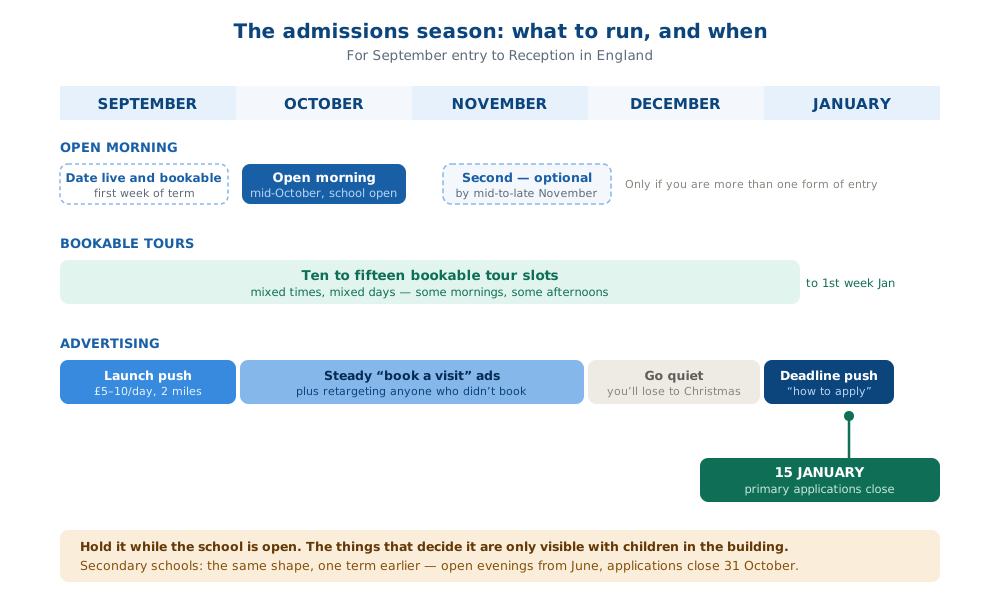
Either way, this calendar is a guide for when to run what ads:
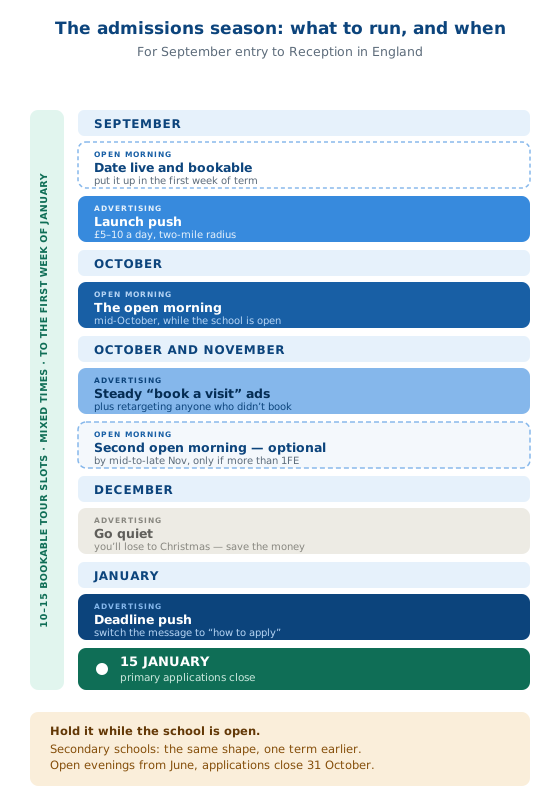
When | What to run |
|---|---|
Late August / early September | First open evening promoted; tours page live and bookable |
September – early December | Steady, low-budget "book a visit" ads; a second open evening no later than mid-to-late November |
Mid December | Go quiet. You're competing with Christmas and losing. |
First two weeks of January | The deadline push — urgency ads to your local audience and everyone who visited but didn't apply |
15 January | Primary applications close in England (31 October for secondary) |
That January window is the most under-used fortnight in school marketing. Parents leave it late, and a school that shows up in the final week with a clear "here's how to apply" message picks up first choices that were genuinely undecided. We’ve written about the choice between tours and open days here.
Measuring it properly
Reach and likes are not the point. Three numbers matter:
Visit bookings — the only real conversion. Count them weekly against the days your ads ran. If you are using Meta Ads Manager rather than Boosted Posts and you have the Meta Pixel installed on your site, your ad dashboard will tell you which ads made how many bookings. Better than trying to map clicks to bookings manually.
Cost per booking — total spend ÷ bookings. Same thing: if you're in Ads Manager with a pixel and a thank-you page, this is automatic. In boost-only campaigns, do the arithmetic by hand; it still works.
"How did you hear about us?" — on the booking form and the tour check-in sheet. Low-tech, and the only way to catch the effect of everything that isn't clickable. Same problem with radio and audio
If a booking is costing you £10 (or even £50 or more) and a pupil is worth at least £5,115 a year in funding, the maths stops being a debate.
When to stop reading and start doing
If you have an open day in three weeks: make the poster, post it on your page, share it into local community groups, boost it for £20 a day, and build a booking page even if it's just a form. That's an afternoon and it will work.
If you're planning a full admissions season: the boost button will run out of road by about November. Ads Manager, a pixel, a booking page and a retargeting audience are what turn a good open day into a full class — and that's the system we've been running for schools since 2018.
Not sure which you need? That's exactly what our Marketing Health Check is for.
Sources
Jon Loomer — Meta Ads Targeting 2026 (Advantage+ audience, detailed targeting as suggestions)
Meta Advantage+ audience vs detailed targeting, 2026 guide (exclusions removed from Ads Manager 2025 and boosted posts June 2025; January 2026 interest-category removals)
GOV.UK — Schools block funding formulae 2026 to 2027 (minimum £5,115 per primary pupil)
School Marketing Works — the falling school roll case study, 2019
Frequently asked questions
How much do Facebook ads cost for a school open day?
A single open day can be promoted effectively for £150–£250: roughly £5–£20 a day for ten to fourteen days to parents within two to three miles, plus a small final-days burst. A full admissions season costs more — the campaign in our published case study spent just under £1,000 across Facebook and Instagram, plus £59 on Google, and filled the Reception class.
Should a school use the boost button or Facebook Ads Manager?
Boost for a single event when time and technical help are short — it takes five minutes and you don't have to set up an ad account, because Meta creates one for you. Ads Manager for a full admissions season, because it's the only route to conversion tracking, a known cost per booking, retargeting, and proper control of the January deadline push.
Can schools still target parents on Facebook in 2026?
Partly. Location and minimum age remain hard controls, and parental status is still available under Demographics — but since Advantage+ became the default, targeting selections are treated as suggestions the system can go beyond, exclusions were removed from boosts in June 2025, and many detailed interest categories were removed in January 2026. Set a tight radius, use parental targeting where offered, and let the creative do the rest of the qualifying.
Does boosting a post create a Facebook ad account?
Yes — you don't set one up yourself, but Meta creates one behind the scenes the first time you boost, and it's usually attached to the personal profile of whoever pressed the button. That means the school's ad history and payment details belong to an individual rather than the school. Setting up Meta Business Suite for the school first and boosting from there avoids it.
Do we need parental consent to use photos of children in Facebook ads?
Check your existing photo consent wording: many school forms cover general "publicity" without specifically addressing paid advertising or social media. Where it's ambiguous, ask the parents of the specific children in your chosen image again, naming the use. Never use an image where consent is unclear or withdrawn, and moderate comments on live ads.
When should a school run Facebook ads for admissions?
Start in late August or early September with the first open evening, run steady low-budget "book a visit" ads through to early December, hold a second open evening no later than mid-to-late November, go quiet over Christmas, then run a deadline push in the first two weeks of January. Primary applications in England close on 15 January; secondary on 31 October.
What should the ad link to?
A page where a parent can book a specific visit — a date, their name, an email, a confirmation. Not the homepage, not a prospectus PDF. In our own campaign the tour booking page outperformed every other landing page we tested, and it's the single biggest determinant of whether ad spend turns into applications.
Ian Clifford is the co-founder of School Marketing Works and has been running admissions campaigns for UK schools since 2018, including the one documented in our published falling school roll case study.